You draw. The AI tries to figure it out.
AI Drawing Games: Quick, Draw! and Games Like It
Compare AI drawing games for solo sketches and playing with friends. Explore Quick, Draw!, Guess the Line and Artbitrator, with clear formats and access notes.
Compare the gamesAn AI drawing game lets you sketch while a computer tries to recognise or respond to your picture. If you enjoyed Google Quick, Draw!, your next choice depends on what you want to change: the prompts, the pace, or who you play with.
We make Artbitrator. This guide compares formats using the official sources linked below and checks of their entry screens on 11 October 2026. It is not a scored playtest or a claim that one game recognises drawings more accurately than another.
Choose the kind of drawing round you want
On a small screen, scroll the comparison sideways.
| Game | What you do | Choose it for | Getting started |
|---|---|---|---|
| Quick, Draw! | Sketch a prompt before a 20-second timer runs out. | A short solo recognition challenge. | Browser; the first prompt opens without an account step. |
| Guess the Line | Draw from creative prompt cards while an AI robot guesses. | Trying different subjects and styles. | Google Arts & Culture browser experiment. |
| Artbitrator | Draw while the AI guesses aloud; friends can draw simultaneously. | Solo arcade rounds or multiplayer races. | Free play; each player signs in. Up to 12 in multiplayer. |
01 · A quick solo challenge
Google Quick, Draw!
Quick, Draw! gives you a prompt and 20 seconds to sketch it while a neural network tries to identify the drawing. Its simple format makes it an easy starting point if you want to see how a recognisable doodle takes shape.
The official game also lets you inspect what it thought your drawing resembled. During our entry check, the first prompt opened directly from “Let’s Draw!” without an account step.
Choose it when: you want a brief solo drawing break. For friends who want their own canvases in a shared competitive room, choose a multiplayer format instead.
02 · A different kind of prompt
Guess the Line
Google Arts & Culture’s Guess the Line uses cards describing what to draw, with an AI robot attempting to recognise the result. Its official introduction gives examples such as a “cubist dog” and a “minimalist tree”, combining a subject with a way to draw it.
Choose it when: you like the AI guessing idea and want prompts that encourage you to experiment with style.
Before you start: open the Arts & Culture experiment and let it load. Our check reached the game’s entry screen within a signed-in Google session; we did not verify a signed-out flow or complete a round.
03 · Solo arcade or a shared drawing race
Artbitrator
Artbitrator combines drawing prompts with live AI guesses and spoken commentary. The format changes depending on whether you want to play alone or bring a group.
- For solo play, choose Arcade. You start with two minutes in a shared time bank. Recognised prompts add time and move you to a harder challenge.
- For friends, choose Multiplayer Madness. Everyone receives the same prompt and draws at once, with up to 12 players. The race is to make the AI recognise your picture.
Choose it when: you want simultaneous drawing and AI commentary as part of the round. For two people, the two-player setup guide explains how to get together.
Before you start: free play requires an Artbitrator account. The play button opens the game menu. Each friend signs in and joins the same room. If you prefer to guess each other’s drawings yourself, our drawing games with friends comparison covers human-guessing formats too.
A useful detail can change the whole picture
Getting an AI to recognise a prompt is a communication challenge. Start with the main shape, then add something that distinguishes it from similar ideas.
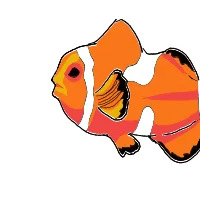
The outline says fish; the bands and colour make the idea more specific.
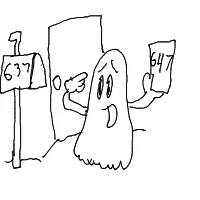
The ghost is only part of the prompt. The mismatched numbers explain the situation.
These are real drawings from the Artbitrator community gallery. The notes describe visible clues in the finished artwork; they are not AI guesses or scores.
A missed guess does not mean a drawing is bad. Try changing the silhouette or adding a distinguishing feature before filling the canvas with more detail. AI recognition is one way to make a game out of sketching, not a verdict on your artistic ability.
What about Iconary?
Iconary’s official description explains a different format: you collaborate with an AI to draw or guess phrases, arranging icons into scenes.
When we checked the game on 11 October 2026, it displayed an outage message. That may change, but check its availability before planning a session around it. The project remains an interesting example of AI as a drawing partner.
Questions before you choose
Which game has the AI guess my drawing?
Quick, Draw!, Guess the Line and Artbitrator all use AI recognition in their drawing formats. The main difference in this shortlist is the kind of prompt and whether you want a solo activity or a multiplayer room.
Is Artbitrator a multiplayer version of Google Quick, Draw!?
It is a separate game made by a different team. Artbitrator offers simultaneous drawing rooms and its own modes; it is not an official Google multiplayer version. See the direct Quick, Draw! alternative comparison for that specific choice.
Does the AI draw the picture for me?
In the three drawing formats above, you make the marks and the AI responds. That is different from typing a request into an image generator.
How does an AI recognise a doodle?
Different games use different systems. Google’s explanation of the Quick, Draw! dataset describes adapting handwriting-recognition technology to recognise doodles. Do not assume every newer drawing game uses the same model or dataset.
What if I just want to practise without a game?
Pick a few funny drawing prompts and sketch them on paper or in your preferred drawing app. You can choose your own pace and compare ideas with a friend without an AI deciding when you are finished.
Sources and checks
Feature descriptions come from the Quick, Draw! game, Google’s Guess the Line introduction, the live Arts & Culture experiment, and Iconary’s about page. Artbitrator’s sections describe our own Arcade and multiplayer formats.
Entry screens were checked on 11 October 2026. We did not run a comparative accuracy test or a complete multiplayer session for this article. Access requirements and availability can change; the linked official pages are the place to check before organising a group.